hello john314
Welcome to the community.
DMZ is the only way to go with the Fibre Box. I don’t believe they will allow Bridge Mode in the future. But then it doesn’t really matter. Also IPv4-only needs to be activated for your internet connection.
I run my own network on Zyxel hardware behind a HFC Box using DMZ. So yes the setup can be achieved with new hardware. You’ll need a router, one or two switches and some access points. The WLAN on the Connect Box needs to be turned off, since it became useless in this setup. Devices connected to the Connect Box can’t communicate with devices connected to the third party router. Also DHCP should be turned off, it’s no longer needed.
But wait, there’s another way: You can turn off DHCP on the Connect Box. The Connect Box will still be available on 192.168.1.1 (default setting) then you add a device that can run as DHCP server. Don’t use a router, you don’t need “another” router. The DHCP Server can run on a NAS or on any other device.
Here’s an example on a Synology NAS:
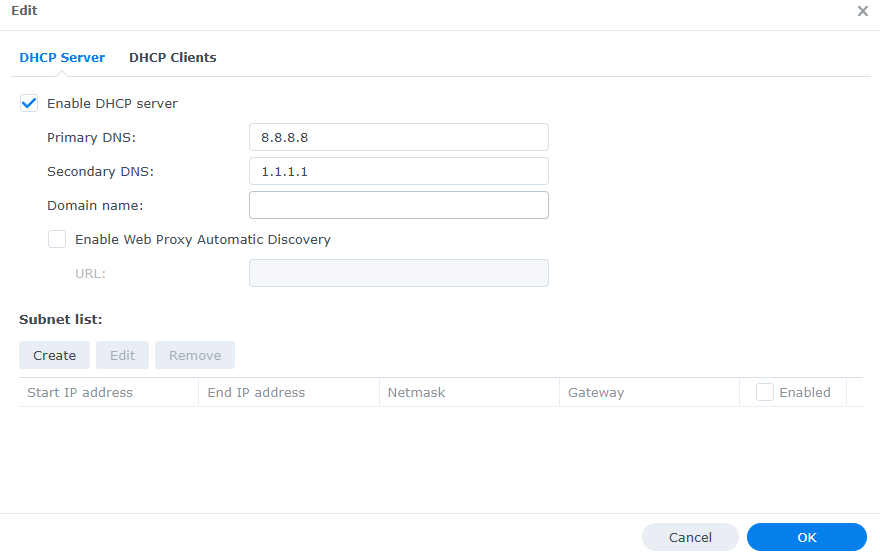
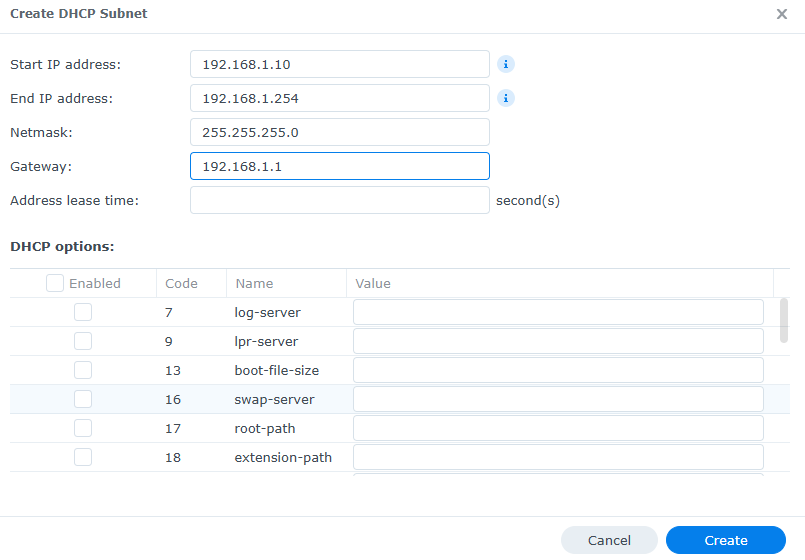
As you can see, you can set custom DNS. The DHCP Subnet should match the IP of the Connect Box and the device the DHCP runs on should have a static IP set (eg. 192.168.1.2).
Now all left, is to get a 10Gbit/s switch (or one that has a 10Gbit/s Uplink port) to multiply the one 10Gbit/s port on the Connect Box.
VPN might be a bit tricky in this setup but it can be achieved.